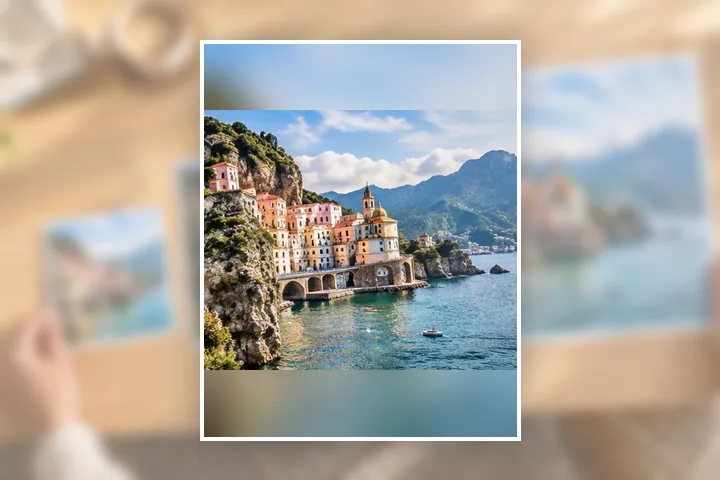
A worked example
A 4032 × 3024 landscape photo into 1080 × 1350: the whole photo is scaled to 1080 × 810 and centred, leaving 270 pixels above and below, which are filled with the photo itself, enlarged to the frame and blurred. With Fill instead, a 2419 × 3024 strip of the photo is kept and the sides are discarded.
When another page here fits better
For a square at exactly 1080, 1080 × 1080 opens with it. For several photos at one shape, bulk resize applies the same rule to each, blur pad included.
What stays on your device
The blur is drawn in a worker in this tab from your own photo. Nothing is uploaded, and there is no account to post from — you post the saved file yourself.
Platforms re-compress what you upload, whatever size you send. Sending 1080 pixels wide avoids an extra resize on their side; it cannot stop their compression.
Questions people ask here
Are these Instagram's official sizes?
They are the commonly used ones. Instagram's Help Center says photos are shown up to 1080 pixels wide; the shapes here — 4:5, 1:1, 9:16 and 1.91:1 — are what posts and stories are commonly made at, not a published specification.
What does Blur do?
It fills the margin with your own photo, filled to the frame and blurred, then sets the whole photo on top. Nothing is cropped and there are no flat bars. Choose White or Black under Pad colour for plain margins.
Can I crop to fill the frame instead?
Yes. Choose Fill under Fit to box and drag the photo to choose what stays; Keep the detail places the crop on the busiest part of the picture.